---
title: How do I update my subscription?
description: Update your Football Play Card subscription from Profile > Subscription. Where it takes you depends on where you bought it, not your device.
---
[Skip to content](https://knowledge.footballplaycard.com/how-do-i-update-my-subscription#main-content)
[](https://footballplaycard.com/?hsLang=en)
- [Testimonials](https://footballplaycard.com/testimonials)
- [Marketplace](https://footballplaycard.com/marketplace)
Show submenu for Marketplace
- [Browse Playbooks](https://footballplaycard.com/marketplace)
- [Become a Seller](https://footballplaycard.com/sell-your-playbook-football-play-card-marketplace)
- [Wristbands](https://footballplaycard.com/play-wristbands)
- Features
Show submenu for Features
- [Product Updates](https://footballplaycard.com/product-updates-release-notes)
- [Video Uploads](https://footballplaycard.com/features/video-uploads)
- [Game Planning](https://footballplaycard.com/features/game-planning)
- [Player Quizzes](https://footballplaycard.com/features/player-quizzes)
- [Help](https://knowledge.footballplaycard.com/)
Show submenu for Help
- [Blog](https://footballplaycard.com/blog)
- [Knowledge Base](https://knowledge.footballplaycard.com/)
- [Quicktips](https://footballplaycard.com/quicktips)
- [Pricing](https://footballplaycard.com/pricing)
- [Login](https://cta-service-cms2.hubspot.com/web-interactives/public/v1/track/redirect?encryptedPayload=AVxigLJ9nEyI0mPyTcMiBnRE9GS7qxavAG0dKik5w98eD0WHFeQfwdfagUzPKYGesT1xT%2F9lGxnbYE69kblo3kwdX%2BplvlO0ZD5lihSMdnVMr9iO0Nw%3D&webInteractiveContentId=118708685676&portalId=540433)
Open main navigation
Close main navigation
- [Testimonials](https://footballplaycard.com/testimonials)
- [Marketplace](https://footballplaycard.com/marketplace)
Show submenu for Marketplace
- [Browse Playbooks](https://footballplaycard.com/marketplace)
- [Become a Seller](https://footballplaycard.com/sell-your-playbook-football-play-card-marketplace)
- [Wristbands](https://footballplaycard.com/play-wristbands)
- Features
Show submenu for Features
- [Product Updates](https://footballplaycard.com/product-updates-release-notes)
- [Video Uploads](https://footballplaycard.com/features/video-uploads)
- [Game Planning](https://footballplaycard.com/features/game-planning)
- [Player Quizzes](https://footballplaycard.com/features/player-quizzes)
- [Help](https://knowledge.footballplaycard.com/)
Show submenu for Help
- [Blog](https://footballplaycard.com/blog)
- [Knowledge Base](https://knowledge.footballplaycard.com/)
- [Quicktips](https://footballplaycard.com/quicktips)
- [Pricing](https://footballplaycard.com/pricing)
- [Login](https://cta-service-cms2.hubspot.com/web-interactives/public/v1/track/redirect?encryptedPayload=AVxigLJ9nEyI0mPyTcMiBnRE9GS7qxavAG0dKik5w98eD0WHFeQfwdfagUzPKYGesT1xT%2F9lGxnbYE69kblo3kwdX%2BplvlO0ZD5lihSMdnVMr9iO0Nw%3D&webInteractiveContentId=118708685676&portalId=540433)
- [Login](https://app.footballplaycard.com/)
[Login](https://app.footballplaycard.com/)
How can we help you?
- There are no suggestions because the search field is empty.
1. [Knowledge Base](https://knowledge.footballplaycard.com/?hsLang=en)
2. [Account & Billing](https://knowledge.footballplaycard.com/account-billing?hsLang=en)
August 10, 2026
# How do I update my subscription?
## Learn how you can update your Football Play Card subscription.
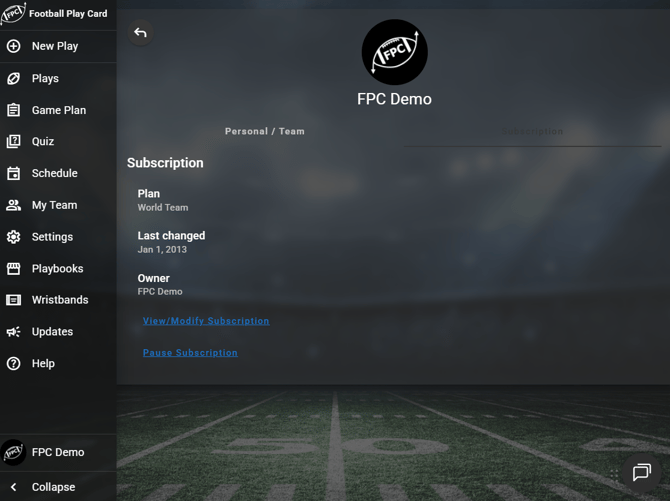
You update your subscription from your account profile. Football Play Card sends you to the right place automatically based on where you bought your subscription, so you do not need to know how you were billed.
How do I update my subscription?
1. Log in and go to **Profile** \> **Subscription**.
2. Select **View/Modify Subscription**.
From there you can change your plan, update your payment method, or cancel.
**Frequently Asked Questions**
**Where does that button take me?**
- It depends on where your subscription was purchased, not on the device you are using right now.
- **Signed up on the web:** your subscription portal
- **Signed up in the iPhone or iPad app, with your App Store set to the United States:** your subscription portal
- **Signed up in the iPhone or iPad app, with your App Store set outside the United States:** the App Store
- **Signed up in the Android app:** Google Play
- Your subscription portal works the same everywhere, on the web, on iPhone, and on Android.
**Why does the Android app always use Google Play?**
- Subscriptions started inside the Android app are purchased through Google Play, so Google Play handles the billing and any changes to it.
**Why am I told to manage my subscription on another device?**
- If you bought through the App Store and open **View/Modify Subscription** on an Android device, you will see **Manage on your Apple device**. If you bought through Google Play and open it on an iPhone or iPad, you will see **Manage on your Android device**.
- Apple and Google do not allow a subscription bought on one of them to be changed from the other. Use the device that matches your store, or use the web.
- **I signed up inside the iPhone app. Do I have to use the App Store to manage it?** Only if your device's App Store location is set outside the United States. If your App Store is set to the United States, your subscription is billed directly by Football Play Card and you manage it exactly the way you would on the web.
**How do I know where my subscription was purchased?**
- You do not need to know. **View/Modify Subscription** routes you to the correct place on its own.
- **I see an Update Subscription button somewhere else in the app. Is that the same thing?** Yes. Some upgrade prompts label the same action **Update Subscription**. It takes you to the same place.
**Can I cancel from here?**
- Yes. Cancelling happens wherever your subscription is billed, which is the same destination this button opens. See "How do I cancel my subscription?"
- [FAQs](https://knowledge.footballplaycard.com/faqs?hsLang=en)
- [Team Types](https://knowledge.footballplaycard.com/team-types?hsLang=en)
- [Account & Billing](https://knowledge.footballplaycard.com/account-billing?hsLang=en)
- [Getting started](https://knowledge.footballplaycard.com/getting-started?hsLang=en)
- [My Team](https://knowledge.footballplaycard.com/my-team?hsLang=en)
- [Building Plays](https://knowledge.footballplaycard.com/building-plays?hsLang=en)
- [Player Quizzes](https://knowledge.footballplaycard.com/player-quizzes?hsLang=en)
- [Mobile App](https://knowledge.footballplaycard.com/mobile-app?hsLang=en)
- [Team Chat](https://knowledge.footballplaycard.com/team-chat?hsLang=en)
- [Schedule](https://knowledge.footballplaycard.com/schedule?hsLang=en)
- [Team Age & Under 13](https://knowledge.footballplaycard.com/team-age-under-13?hsLang=en)
- [Parents & Followers](https://knowledge.footballplaycard.com/parents-followers?hsLang=en)
- [Game Day](https://knowledge.footballplaycard.com/game-day?hsLang=en)
- [Player Assignments](https://knowledge.footballplaycard.com/player-assignments?hsLang=en)
- [Wristbands & Printing](https://knowledge.footballplaycard.com/wristbands-printing?hsLang=en)
[](https://footballplaycard.com?hsLang=en)
Copyright © 2013 - 2026, Championship App Development, LLC. All Rights Reserved.