
When your team plays, Game Day shows the live score as the scorekeeper updates it, and the live video whenever someone on the team is streaming the game. There is nothing to refresh: the score moves on its own.
How do I see the live score?
- Select Schedule in the side menu.
- Select the game. It opens on Game Day.
- The Scoreboard card shows the score, the period, the clock, who has the ball and the timeouts left.
The Scoreboard card appears around kickoff, and the score starts moving when the scorekeeper starts the game. Once the game is marked final, the final score stays on the game for good. If the card is not there at kickoff, open the game again.
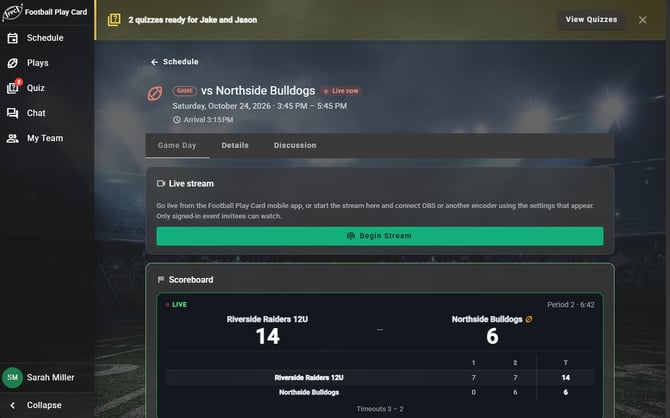
The score updates on its own while the scorekeeper keeps it.
How do I watch the live stream?
- Open the game's Game Day tab.
- While the game is streaming, select Watch Live under Live stream.
- Select Stop watching when you are done.
In the mobile app you get a notification when the stream starts, with your team, the opponent and is live. Tap it to go straight to the game. See "How do I turn on push notifications on my phone?"
Frequently Asked Questions
Why can I not watch the stream?
- The stream is full. Up to 20 people can watch at once. A seat frees up when someone leaves, so try again in a minute.
- You follow the team as a Fan. Fans see the live score but not the video. Ask the coach whether you can follow as a Family & Friend instead.
- You are a player who was not invited to this game. Players can watch the games they are invited to.
- Nobody is streaming. Watch Live appears only while somebody is streaming the game.
- It says "Could not start the stream." If your connection is fine, you cannot watch this game. Fans cannot watch the video, and players can watch only the games they are invited to.
Is the stream public?
- No. The video is for your team only: the coaches, the players invited to the game, Parent/Guardians and Family & Friends. A coach can share a public link to the live score. The link never plays the video: people who open it see the score and a Log in to watch button, and only people on your team who can watch the stream see it after they log in. See "How do I share the live score with people who don't have an account?"
Can I watch the game again later?
- Yes, if you can watch the stream. Every streamed game is saved for your team. Find it under Videos on the game's Game Day tab, or on the Videos page in the side menu. See "How do I watch a recorded game?"
Why did the score stop moving?
- Usually your own connection dropped. The score card shows a small offline sign and catches up on its own once you are back online. If the scorekeeper loses signal, the score does not change until they are back online.
Everything in this article works on the Football Play Card website on any device. If something is not in your mobile app yet, it is coming in an app update soon.