
The live scoreboard turns your phone or tablet into the sideline scoreboard. Every score, quarter and timeout you tap reaches your team on Game Day as it happens, and the final score is saved on the game.
How do I start the scoreboard?
- Open the game from Schedule. It opens on Game Day.
- Select Launch Scoreboard on the Scoreboard card.
- At kickoff, select Start game.
- Check the rules in Confirm game rules, then select Start game.
- Select Start to run the clock. The clock stays stopped until you do.
The rules you confirm here apply to this game. To change the rules your games start with, see "How do I set up game rules for my league?"
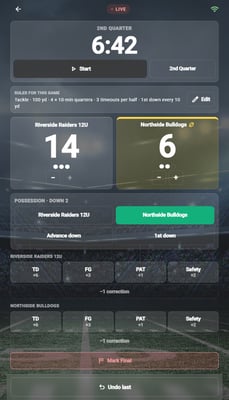
The scoreboard during a game. Undo last stays pinned to the bottom.
How do I keep score?
| Control | What it does |
|---|---|
| TD +6, FG +3, PAT +1, Safety +2 | Adds that score for the team. Games played under flag rules have no FG button. |
| −1 correction | Takes one point off, to fix a mistake. |
| The clock | While it is stopped, select the time to set it. Start and Pause run it. |
| The period button, for example 1st Quarter | Ends that period once you confirm. Ending the first half puts the board on Halftime. Select Start to begin the second half. In the last period it reads Go to OT 1 instead. |
| − and + under each team | Uses a timeout, or gives one back. Using one also stops the clock. |
| The team buttons under Possession | Sets who has the ball. Advance down and 1st down keep track of the down. |
| Log blitz | Counts a defensive blitz. It appears only when the game's rules limit blitzes. Set possession first. |
Tapped the wrong thing? Undo last at the bottom of the screen takes back your recent taps on this device. It starts over if someone else changes the score or you reload the page.
How do I end the game?
- Select Mark Final.
- Select End game.
Marking the game Final locks the scoreboard and saves the score on the game. If you ended it by mistake, select Reopen game and confirm.
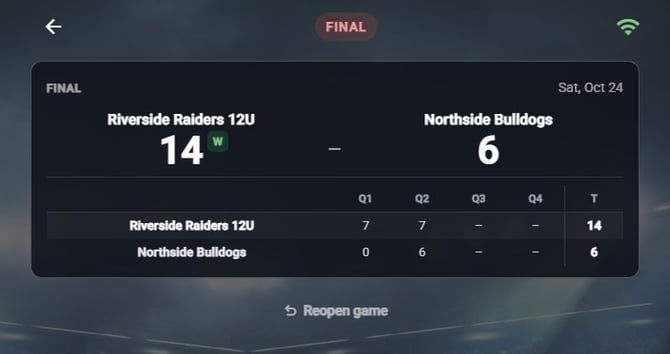
After Mark Final the board locks and shows the final score by quarter.
Frequently Asked Questions
Who can keep score?
- Every coach on the team. You can also pick other people in the game's Scorekeeper(s) field, which starts on whoever created the game. On a repeating game, the scorekeepers apply to every date in the series. You can pick players with an account, and Parent/Guardian and Family & Friend followers, who show as Team Fan in the list. Fans and players without an account are not listed and cannot keep score.
What if two people keep score at once?
- The scoreboard keeps one score. If somebody else changes it while you are tapping, your screen says someone else updated the score and switches to the latest score. The tap you just made does not count, so check the score and tap again if you need to. Agree on one scorekeeper per game to avoid it.
What happens if I lose signal?
- The scoreboard shows Reconnecting… and keeps trying. If a tap cannot be saved within 10 seconds, a message says it couldn't save and to check your connection. Check the score once you are back online, and fix it with the score buttons or −1 correction.
Does the team hear about the score?
- The game's Discussion tab gets a line when the game starts, at each score, when the ball changes hands, at the start of each quarter or half, at halftime and at the final score. Score changes do not send a phone notification.
Why did my tackle game start on flag rules?
- A new game starts on your team's default rules. A team with no default starts on the rules for what it plays, as set under This team plays in My Team: Tackle · 100-yard field for tackle, and Flag · 50-yard field for flag or 7 on 7. If you coach more than one team, only your primary team's setting is read, so your other teams start on Flag · 50-yard field until they have a default. So a tackle game on flag rules means your team default is a flag template, the team is set to flag or 7 on 7, or it is not your primary team. Pick Tackle · 100-yard field in the game's Game rules field before kickoff. When your team has no default yet, Confirm game rules also offers Make these my team’s default rules. It starts unticked, so tick it only if every game after this one should use the same rules. See "How do I set up game rules for my league?"
Which plans include the live scoreboard?
- State Champion and above. Following the score is free for everyone on the team.
Everything in this article works on the Football Play Card website on any device. If something is not in your mobile app yet, it is coming in an app update soon.