
Pausing your subscription stops your billing for a stretch of the off-season and keeps your account, your plays and your playbooks exactly as you left them. It is the alternative to cancelling when the season ends.
How do I pause my subscription?
-
Sign in. Select your picture (top right on a phone, bottom of the side menu on a computer), then select Profile.
-
Select the Subscription tab.
-
Select Pause Subscription.
-
In the Pause your subscription box, select the calendar next to Resume on and pick the day you want billing and access to start again. The earliest day you can pick is tomorrow.
-
Select Pause subscription. A Subscription paused message confirms the date, and we email you a confirmation.
Do not see Pause Subscription? It only shows for the coach who pays for the team and bought the subscription on the Football Play Card website. If you bought through the Apple App Store or Google Play, select View/Modify Subscription to manage it there. Assistant coaches, players and followers cannot pause the team's subscription.
You are not billed while the subscription is paused, and it starts again on its own on the date you picked. You do not have to remember to come back.
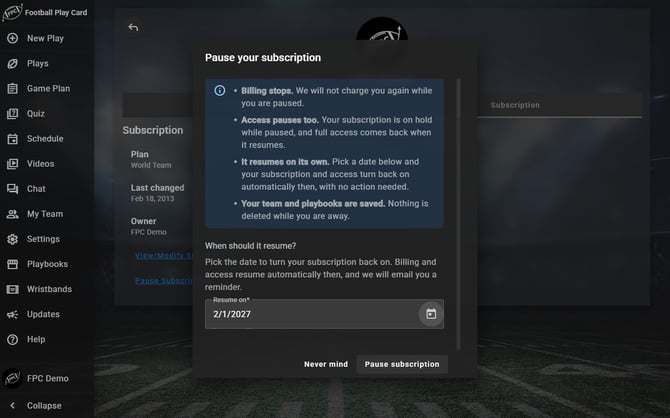
Pick the date it should resume, then select Pause subscription.
How do I resume early?
-
Go to the Login screen. Enter your username and password and select Login.
-
Instead of logging you in, a message says your subscription is paused and when it will resume, and a Resume subscription now button appears.
-
Select Resume subscription now.
Billing starts again and you are logged straight in, without typing your details again.
Frequently Asked Questions
What happens to my plays while I am paused?
-
Nothing. Your plays, folders and playbooks stay where they are. Pausing is not cancelling and it does not delete anything.
Can I use the app while I am paused?
-
No. A paused subscription means you are not billed, and while it is paused you cannot sign in and use the app. If you want access, resume early.
-
This applies to your whole team. Assistant coaches, players and followers use your team's subscription, so they cannot sign in while it is paused either. Tell your team before you pause.
Should I pause or cancel?
-
Pause if you plan to coach again. You keep everything and skip the off-season bills. Your subscription starts again on the date you picked, or sooner if you resume it from the Login screen. Cancel only if you are done with the app.
Everything in this article works on the Football Play Card website on any device. If something is not in your mobile app yet, it is coming in an app update soon.