
Game Plan needs a State Champion plan or above and is for your team's coaching staff. Once you have built a call sheet there, you can send it straight to the wristband printer. You do not re-pick the plays, and the order you put them in on the call sheet is the order they print.
How do I print wristbands from a call sheet?
-
Select Game Plan in the side menu and open your call sheet.
-
Select More actions (the three dots), then Print Wristbands.
-
Tick the sections you want on the wristband. Each section shows how many plays it holds.
-
Select Print Wristbands. The Print page opens with your plays in call sheet order, set to Wristband, which prints play diagrams.
-
To print play names only, choose Play List Wristband instead. Then select Print.
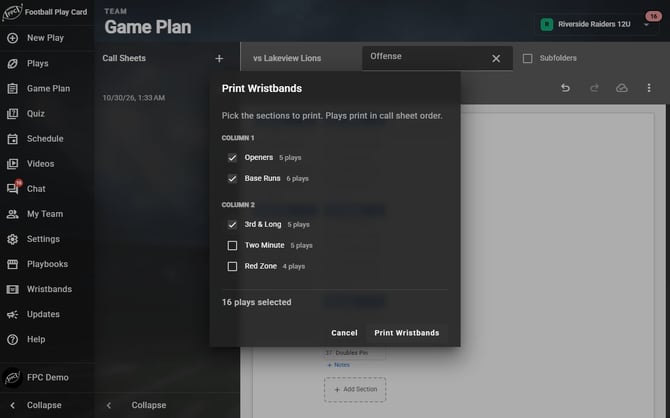
Tick the sections you want. Each one shows how many plays it holds.
Frequently Asked Questions
What order do the plays print in?
-
Exactly the order they sit in on your call sheet. Plays follow their section's order, and sections follow the call sheet, column by column. Section names do not print, and the call sheet's numbering does not carry over: a Play List Wristband shows each play's Play Card Number.
What is the difference between diagrams and names only?
| Print type | What you get |
|---|---|
| Wristband | The full play card for each play. Section notes are left off, because a note has no diagram. |
| Play List Wristband | A list of play names, with each section's notes included after that section's plays. |
-
If you write reminders into your section notes, choose Play List Wristband so they travel to the wristband with the plays.
Why does it say a play appears in more than one section?
-
Because it does, and that is usually on purpose. A play you put under both 3rd & Long and Two Minute prints twice, once in each section, so the wristband matches the call sheet you planned. The notice tells you how many plays repeat before you print, so the cost in card space is not a surprise.
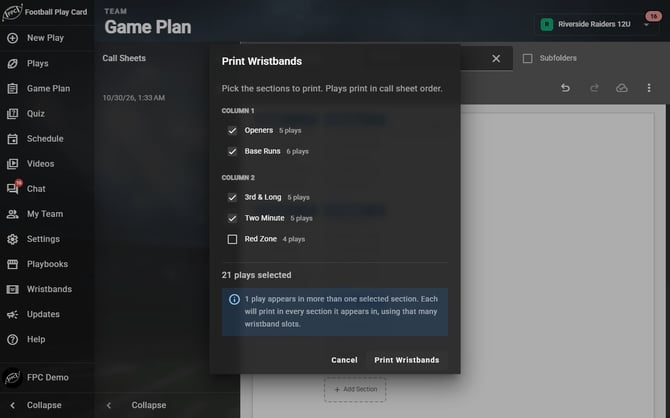
Trips Right Stick is in both 3rd & Long and Two Minute, so it prints in each.
Is there a limit?
-
You can send up to 100 plays to the printer at once, counting a repeated play once for each section it appears in. If you go over, the dialog says Too Many Plays and will not print until you take a section out. Print that section separately.
Everything in this article works on the Football Play Card website on any device. If something is not in your mobile app yet, it is coming in an app update soon.