
Push notifications tell you on your phone or tablet when a coach posts an announcement, when someone mentions you in chat, or when a quiz is assigned, without opening the app. Push notifications come from the Football Play Card mobile app. The website does not send them, so you need the app installed and signed in on any device you want to hear from.
Which app do I install?
There are two apps. Install the one your coach uses.
| Your team plays | Install | iPhone and iPad | Android |
|---|---|---|---|
| Tackle football | Football Play Card & Playbook | App Store | Google Play |
| Flag football | Flag Football Play Card | App Store | Google Play |
If you are not sure which one your team uses, ask your coach. Signing in to the wrong one will not show you your team.
If you installed the app a while ago, update it before anything else. Push notifications need the latest version of the app. An older version cannot receive them, however your settings are set.
How do I turn push notifications on?
- Install the app, or update it if you already have it.
- Open the app and sign in.
- When your phone asks whether to allow notifications, choose Allow.
That is all there is to it. Signing in is what registers your phone, so there is nothing else to switch on inside the app.
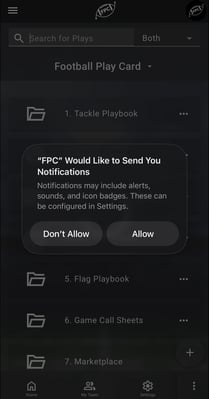
iPhone and iPad
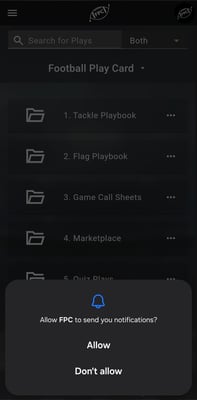
Android
How do I stop them?
Pick whichever fits:
- Mute one team's announcements with the bell at the top of that team's Chat. Your other teams are not affected, and mentions, new quizzes and live games still reach you.
- Sign out on that device to stop everything to it.
- Turn notifications off for the app in your phone's settings.
Frequently Asked Questions
I tapped "Don't allow". How do I fix it?
- Turn notifications on in your phone's own settings, then reopen the app. On an iPhone or iPad, the app will not ask you a second time. On Android, it may ask once more the next time you sign in. Either way, nothing in the app looks any different when notifications are off, so this is worth checking if you are not hearing from your team.
- Your phone shortens the app's name, so it will not appear in the settings list as Football Play Card. Look for FPC if you use the tackle app, or FPC Flag if you use the flag app.
On an iPhone or iPad
- Open Settings.
- Select Notifications.
- Find FPC or FPC Flag in the list of apps.
- Turn Allow Notifications on.
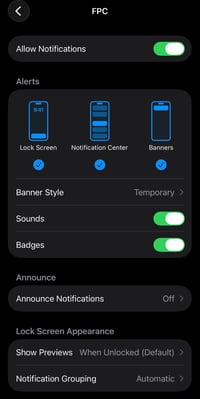
What the FPC notification settings look like on an iPhone once they are on.
On an Android phone or tablet
- Open Settings.
- Select Apps, then find FPC or FPC Flag.
- Select Notifications.
- Turn Allow notifications on.
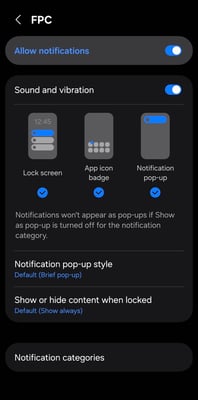
The same settings on an Android phone.
- Then do this last step. Close the app completely and open it again, or sign out and sign back in. Your phone registers itself when you sign in or reopen the app, so it needs one of those before the change takes effect.
What will I actually get notified about?
- Announcements your coaches post, which is how a schedule change reaches you.
- Mentions, when somebody types @ and your name.
- New quizzes, when a coach assigns you one. A parent gets one for each child they take quizzes for, reading New quiz for and the child's name.
- Live games, when your team starts streaming a game and when the stream ends.
- Ordinary chat messages do not send a notification. They wait for you as an unread dot in the app.
Why am I still not getting notifications?
Work down this list.
- Is the app up to date? This is the most common reason.
- Are you signed in to the right app? The tackle and flag apps are separate, and only the one your team uses gets its notifications.
- Are you signed in on that device? Signing out stops notifications to that device on purpose.
- Have you muted the team? Open Chat, pick that team and check the bell at the top.
- Are notifications allowed in your phone's settings? See above.
- Is your phone on Do Not Disturb or a Focus mode? That silences them without switching them off.
- Is your team's plan State Champion or above? Team chat and player quizzes, and the notifications that come with them, are included from State Champion up.
Can I get notifications on more than one device?
- Yes. Sign in on each one and allow notifications there. Your phone and your tablet are registered separately.