
Game Day is the tab on every game in your team schedule where the game happens live. Your scorekeeper runs the scoreboard from the sideline, someone on the team can stream the game from their phone, and everyone else follows along from the stands, the car or home. Every streamed game is saved, so the team can watch it again.
How do I open Game Day?
- Select Schedule in the side menu.
- Select the game. It opens on its Game Day tab.
Only games have a Game Day tab. Practices, tournaments and meetings open on Details. When a game is your team's next event, the top of the Schedule screen also shows a Game Day button until kickoff.
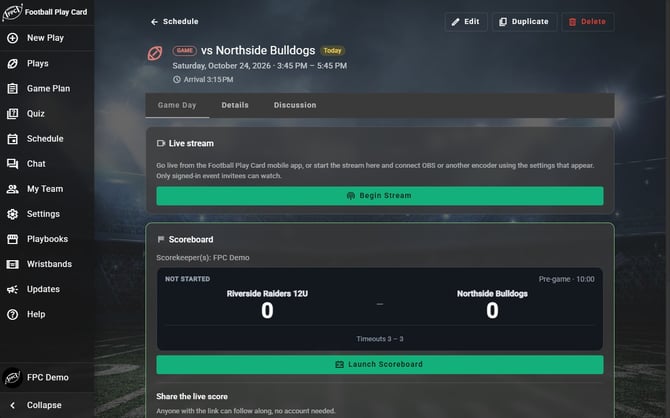
Every game opens on Game Day.
What is on the Game Day tab?
| Card | What it shows |
|---|---|
| Live stream | The game's live video, while someone on the team is streaming it. |
| Videos | The saved video of the game once it has been streamed. It shows up a few minutes after the stream ends. |
| Scoreboard | The live score, the quarter or half, the clock, who has the ball and the timeouts left. After the game, the final score by quarter. |
| Game info | The opponent and whether you are home or away. Coaches and players also see who is keeping score and the final score. |
| Weather | The forecast for the game's location, once the game is within 16 days. |
The Scoreboard card shows up around game time. Once the scorekeeper marks the game final, the final score stays on the game for good. Coaches and scorekeepers see the card at any time, so they can get ready before kickoff. If the card is not there at kickoff, open the game again.
Frequently Asked Questions
Who can see what on Game Day?
| Follow the live score | Watch the stream | Stream the game | Keep score | |
|---|---|---|---|---|
| Coaches | Yes | Yes | Yes | Yes |
| Players with an account | Yes | Games they are invited to | Yes | When a coach picks them |
| Parent/Guardian | Yes | Yes | Yes | When a coach picks them |
| Family & Friend | Yes | Yes | Yes | When a coach picks them |
| Fan | Yes | No | No | No |
- A player without an account, which is every player on an Under 13 team, cannot sign in, so their parent follows Game Day for them. A Fan sees the venue and town but not the full address, unless the head coach turns on Show full addresses on the Followers tab.
- Anyone who can watch the stream can also watch the saved video afterward. See "How do I watch a recorded game?"
Does everyone get a notification when we score?
- No. Score changes do not send a phone notification. Instead, the game's Discussion tab gets a line when the game starts, at each score, when the ball changes hands, at the start of each quarter or half, at halftime and at the final score. A phone notification goes out when someone starts streaming the game, and again when the stream ends. It goes to the people who can watch the stream, but not to the person streaming and not to Fans.
Which plans include Game Day?
- Game Day comes with State Champion and above, the same as the team schedule. Anyone on your team can follow the live score. Keeping score, streaming, and watching the stream or game videos need a State Champion plan on the account doing it. For players and followers who joined from your invite, that is normally your team's plan.
Everything in this article works on the Football Play Card website on any device. If something is not in your mobile app yet, it is coming in an app update soon.