
Team age tells Football Play Card how old the players on your team are: Under 13, 13-18 or 18+. Team age decides how the app handles player accounts on your team, so every team has one, and the coach who owns the team sets it.
What does each team age mean?
| Team age | What happens when you add a player |
|---|---|
| Under 13 | The player goes on your roster without an account. You add their parent's email instead, and the parent gets an invite to follow the team for them. |
| 13-18 | You can invite the player to the app. If one player is younger than the rest, tick This player is under 13 and add their parent instead. |
| 18+ | You invite players to the app as usual. |
A player who accepts an invite is asked their birth month and year before their account is made. See "Why am I asked for my birth month and year?"
How do I set team age when I add a team?
- Select Plays in the side menu, then select Teams at the top of the folder list.
- Select the Add Team card.
- Enter the team name.
- Under How old are the players on this team?, choose Under 13, 13-18 or 18+.
- Select Create.
Team age is required for a new team, so Create stays unavailable until you pick one.
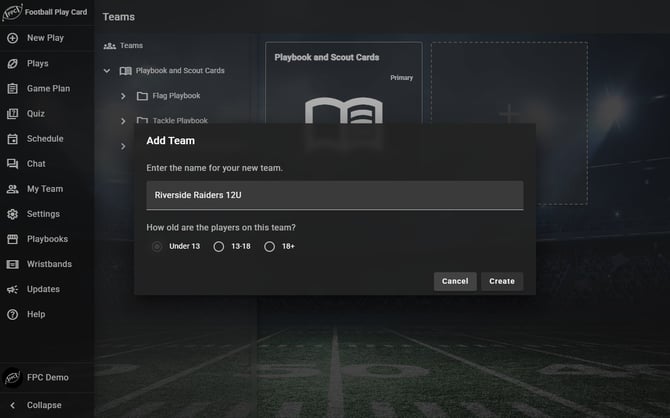
Create stays unavailable until you choose the team age.
How do I set or change team age for a team I already have?
- Select My Team.
- Open the Roster tab.
- Find Team age: in the toolbar above your roster. A team that has never had one shows Not set.
- Select it and choose Under 13, 13-18 or 18+.
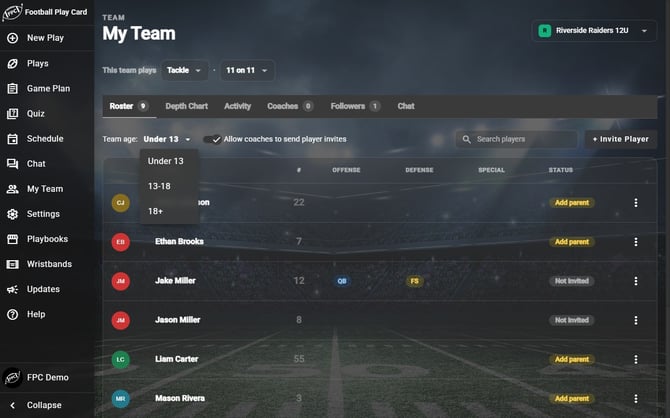
Team age sits at the top of the Roster tab.
Changing to 13-18 or 18+ saves straight away. Changing to Under 13 saves straight away too, unless some of your players already have their own accounts or a pending invite. Then the app asks you about each of those players first. See "How do I switch my team to Under 13?"
Frequently Asked Questions
Why does Football Play Card ask for team age?
- Players under 13 never get their own Football Play Card account. On an Under 13 team, each player is on your roster without an account, and their parent or guardian follows the team for them. That parent answers the player's RSVPs and takes the player's quizzes. Team age is how the app knows which way to set up each player you add.
Who can change team age?
- Only the coach who owns the team. Other coaches, players and followers do not see the Team age control.
My team was set up before team age existed. What do I need to do?
- Set your team age now from the Roster tab, using the steps above. Teams made before this update show Not set. If your players are under 13, set the team to Under 13. For each player who already has an account, the app asks whether they are 13 or older or Under 13. A player you mark Under 13 loses their login, their account is deleted along with their RSVPs and quiz answers, and their parent takes over for them. See "How do I switch my team to Under 13?"
- If you do not set it, Football Play Card asks for you. The next time you select + Invite Player, a Team Age question appears first, and you choose the age before the Add Player form opens. Players cannot be invited until a team has an age, so an assistant coach who tries to invite a player on a team with no age is told: Ask your head coach to set the team's age in My Team settings before inviting players.
What if our league sets our team age?
- If your team belongs to a league that sets an age for its divisions, your team takes the age of its division. The Team age control shows the age with the note Your league sets this team's age. Ask your league to change it.
Does team age depend on my plan?
- No. Setting team age, and adding a parent for a player under 13, work on every plan. What the parent can then do for their player, such as the schedule and quizzes, follows your plan as it does for everyone else on your team.